
Version Summary
Summary Description
UPM 25.3 Release introduces several enhancements to support the Partner Journey on the ZINFI Unified Partner Management (UPM) platform. These enhancements help streamline processes across the Administration, Onboarding, Enablement, Marketing, Sales, Incentive, and Acceleration phases.
Administration
- Unified Fields’ Attributes Configuration Panel: ZINFI's latest enhancement in UPM introduces a centralized panel for bulk management of field-level attributes, such as Required, Exportable, and Unique—streamlining configuration and eliminating the need to update each field individually.
- Manage System Email Templates via CMS Editor: Introduced in the 25.3 release, this enhancement allows System Email Templates to be managed via the CMS Editor instead of the classic CKEditor, offering a more visual, dynamic, and streamlined editing experience aligned with broader content workflows in UPM.
- Email Template Preview Feature: Introduced in the 25.3 release, this feature adds a Preview option for System Emails, allowing Admins to instantly visualize how emails, complete with dynamic content, will appear to recipients. This ensures greater accuracy and formatting confidence before saving or sending.
- Badge Template Management: The 25.3 release introduces dynamic badge template distribution based on partner tier and region, allowing Admins to automate delivery and ensure partners receive personalized badges directly in their My Account section.
- Universal Date-Time Picker: The 25.3 release introduces a unified Date-Time Picker, allowing users to select both date and time from a single interface for more precise filtering and a consistent experience across the UPM platform.
- Primary Button (CTA) Configuration for Card and Template Layouts: The 25.3 release introduces support for primary and collapsible button configurations in Card and Template layouts, enabling consistent and flexible action button behavior across all layout types in UPM, including mobile and desktop views.
- Featured Light UI/UX Upgrade and Field Label Alignment Enhancements: A new Light UI theme and left-aligned field layout have been introduced to enhance visual clarity and usability. Both are enabled by default but can be turned off for a customizable experience.
- Bulk Operation Logs in My Account: A new Bulk Operation Log in the My Account area provides visibility into import/export activities, including status, file details, and errors—enhancing traceability for large-scale data actions.
- Power BI Dashboard Embedding: Admin users can now embed live Power BI dashboards directly into the UPM portal via Report Configuration, enabling real-time insights and improved in-app reporting. This enhancement expands beyond previous third-party embedding limitations by allowing direct integration from organizational Power BI workspaces.
- Lookup-Based Filtering in Advanced Search: Advanced Filter now supports lookup-based filtering, allowing users to apply conditions on related objects’ fields for more precise record searches and better data segmentation.
- Mandatory Region Association and Abbreviation Enforcement in Country Master: The Country Master application now enforces mandatory region tagging and standardized country abbreviations to ensure data consistency and improve integration and reporting accuracy.
- Mandatory Country Code Configuration across Applications: Country dial codes are now fully integrated across key applications, ensuring all phone numbers are standardized with the correct country codes for improved global communication.
- Country-Region Mapping with Abbreviation Support: The Region application now displays complete country abbreviation details alongside mappings, streamlining regional data verification and eliminating the need to reference the Country Master separately.
- Email Notification for Bulk Assets Uploaded in a Time Frame: This feature automatically alerts partners about assets uploaded within a set time frame. Admins can configure notification settings and email templates, with notifications including direct asset links for quick access and co-branding. Frequency can be set to monthly or quarterly, ensuring partners receive consolidated updates on all published assets at the end of each period.
Onboard
- Auto-Completion of Asset Task Requirements: The enhanced Asset Task Type automates completion of asset-related requirements. Admins can configure tasks tied to published assets and select a Completion Criteria of either Asset Co-branded or Asset Approved. Once the chosen condition is met, the system automatically marks the task as complete.
- Auto-Completion of Content Library Task Requirements: The enhanced Content Library Task Type enables automatic completion of content-related requirements. Admins can configure tasks tied to published content and set the Completion Criteria as Content Viewed, Content Downloaded, or Content Shared. Once the selected action is performed, the system marks the task as complete.
- Auto-Completion of Contract Task Requirements: The enhanced Contract Task Type supports automated completion of contract-related requirements. Admins can create tasks linked to published contracts and define the Completion Criteria as Contract Signed. Once the contract reaches the Signed status, the task is automatically marked complete.
- Auto-Completion of Deal Registration Task: The enhanced Deal Registration Task Type allows tasks to be auto-completed based on partner deal submissions. Admins can set the Criteria Type as either Deal Count or Deal Revenue to define task requirements. Once the specified number of deals or total revenue is reached with approved deals, the task is automatically completed.
Sell
- Base Currency Symbol Display Enhancement: To improve financial clarity, the UPM portal now displays currency symbols alongside base currency amounts, eliminating confusion when managing multiple international currencies.
Incentivize
- Approval Workflow for Incentive Rules: To improve auditability and ensure consistent incentive calculations, the 25.3 release introduces an Approval Workflow for the Incentive Rules Engine. Incentive rules, across MDF, Rebates, and Commissions, are now executed only after approval, preventing errors from unapproved or mid-cycle changes.
- Rebate Projection: The Rebate Projection feature gives Admins early visibility into upcoming rebate payouts. Previously, rebate amounts were only available after the payout cycle. Now, Admins can view projected amounts based on partner sales data and uploaded invoices, enabling better planning.
Accelerate
- Email Notification Label Enhancement in Communities: Email notification frequency labels in the Community application have been updated for clarity, replacing terms like “Weekly” and “Bi Weekly” with more user-friendly phrases such as “Every week” and “Every two weeks.”
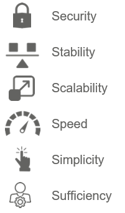
ZINFI 6 S’s of CX Strategy
UPM 25.3 Features
Unified Fields’ Attributes Configuration Panel
Related Application(s)
Workflow Management
Feature Description
With this latest enhancement in UPM, ZINFI introduces a centralized panel to manage field-level attributes, viz. Required, Exportable, Unique, etc., with ease and efficiency. This streamlines the user experience by enabling direct, bulk attribute management across multiple fields in a single window, eliminating the previous need to navigate individually through each field's configuration in the workflow application.
Previous Behavior
- Traditionally, configuring field properties such as Required, Exportable, Filterable, Searchable, Trackable, and Unique involved several steps:
- Open Workflow for the specific Application viz. Prospects.
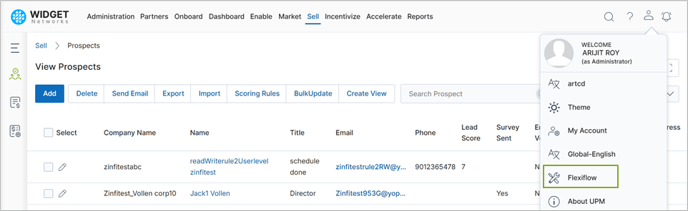
- Open individual field details.
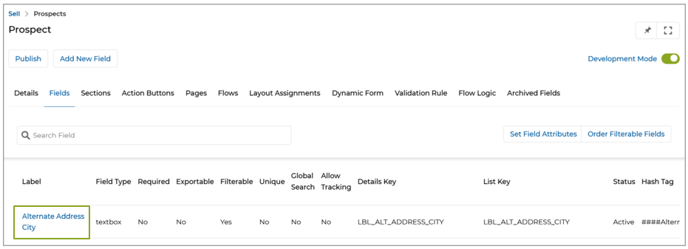
- Modify attributes using individual toggle buttons per field.
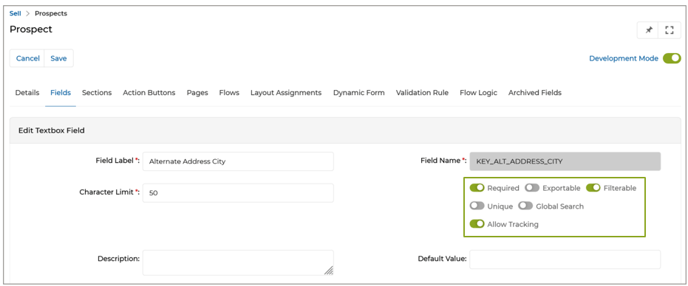
- Repeat the process for each field, one at a time.
- This method was time-consuming and inefficient, especially for large data models.
New Feature: “Set Field Attributes” Panel
- Navigate to the specific application (e.g., Prospects).
- Access the Workflow editor for that application.
- Click on Set Field Attributes.
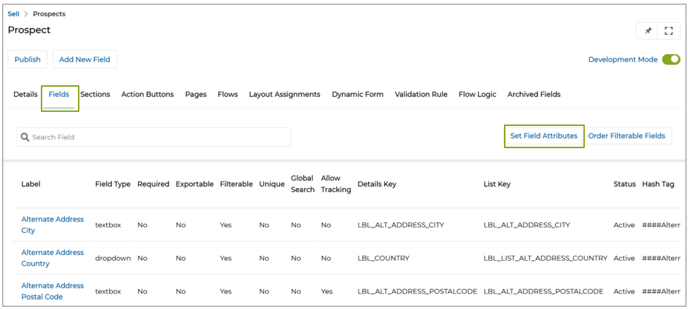
- This opens a scrollable and searchable matrix where you can:
- Filter fields.
- Check/uncheck attributes.
- Click “Save” to apply updates in real time.
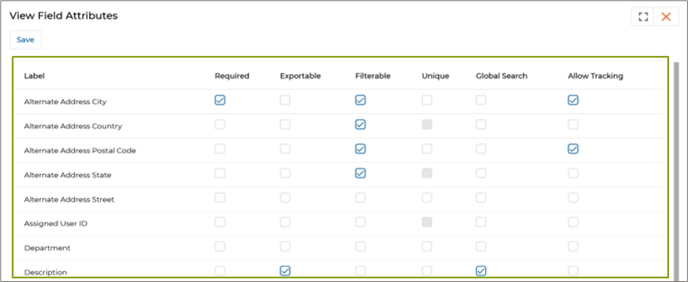
- With the introduction of the Set Field Attributes feature – accessible via the Fields tab in Workflow – users can now:
- View a consolidated matrix of all fields and their current attribute statuses.
- Enable or disable field-level properties (like Required, Exportable, Filterable, Unique, Global Search, Allow Tracking) across multiple fields in bulk.
- Instantly update attributes via checkbox toggles with real-time UI feedback.
- Avoid accidental misconfigurations by working within a clean, tabular layout.
Origin of Feature
Customer request. The feature simplifies and accelerates field attribute configuration across applications within the UPM portal by introducing a centralized “Set Field Attributes” panel in Workflow.
CX Strategy Relation (6 S’s)

Portal User-Facing Benefits
This feature allows Admins to centrally configure field attributes from the Workflow's “Set Field Attributes” panel.
______________________________________________________________________________________
Manage System Email Templates via CMS Editor
Related Application(s)
Alerts & Notification Management
Feature Description
In our continued efforts to streamline content editing and template customization workflows, we have introduced a powerful upgrade to how System Email Templates are managed in the ZINFI platform.
Email templates previously managed through the classic CKEditor interface are now seamlessly integrated into the CMS Editor – the same interface used for managing broader content applications in UPM. This shift allows for a much richer, more visual, and dynamic email composition experience, eliminating the formatting constraints of traditional rich-text editing.
- When editing a system email (e.g., User Registration Confirmation), users are now directed to the CMS Editor interface.
- This editor provides a drag-and-drop structure with full layout control and visual editing, aligning with how CMS pages are managed in UPM.
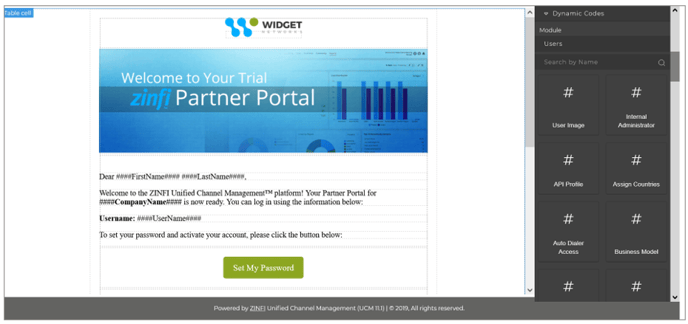
- Each System Email is mapped to a specific application (e.g., Users, Prospect, MDF Rule Engine).
- In the CMS Editor, a dedicated panel on the right displays hash code blocks relevant only to that selected application.
- These hash codes (e.g., ####UserName####, ####CompanyName####) are pulled dynamically from workflow field configurations associated with that application.
- This reduces clutter and makes selecting appropriate dynamic values faster and more accurate.
Enhanced Preview & Personalization
- The enhanced preview layout lets users view dynamic content placement in real time.
- This clarifies how personalized values will be rendered when emails are triggered, minimizing formatting errors and misplacements.
Origin of Feature
Customer request. The feature is designed to enhance the user experience of managing system email templates in UPM by migrating email editing from CKEditor to the CMS Editor.
CX Strategy Relation (6 S’s)

Portal User-Facing Benefits
This feature allows Admins to design and personalize system email templates using the CMS Editor.
______________________________________________________________________________________
Email Template Preview Feature
Related Application(s)
Alerts & Notification Management
Feature Description
To improve accuracy and confidence during email template creation, we have introduced a Preview option for System Emails in the ZINFI platform. This feature allows admin users to instantly view how an email template will appear when received, including dynamic content representation.
This real-time visualization ensures that placeholders are correctly used and that the email formatting is aligned with expectations before it is saved or triggered.
- Go to Administration > System Emails.
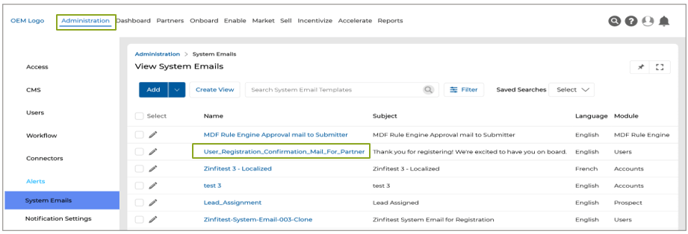
- Select an email template from the list.
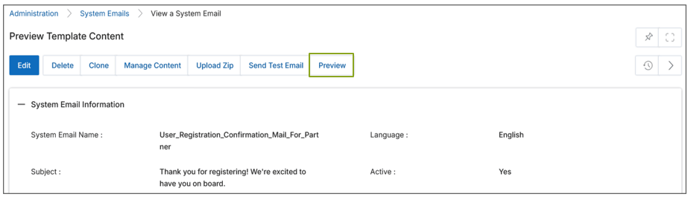
- Click the Preview button.
- The email opens in preview mode, where:
- You can review layout and formatting.
- You can verify if placeholders are correctly placed.
- Any missing or invalid placeholder will remain unreplaced, helping identify configuration gaps.
- All dynamic placeholders/attributes (e.g., <FirstName>, <UserName>) are replaced by their corresponding field labels (e.g., First Name, User Name) during preview.
- This allows users to validate:
- Whether placeholders are correctly inserted.
- Whether any placeholder is missing or improperly configured.
- The preview also reflects any formatting applied in the template, such as bold or italic styling, giving a realistic view of the final email.
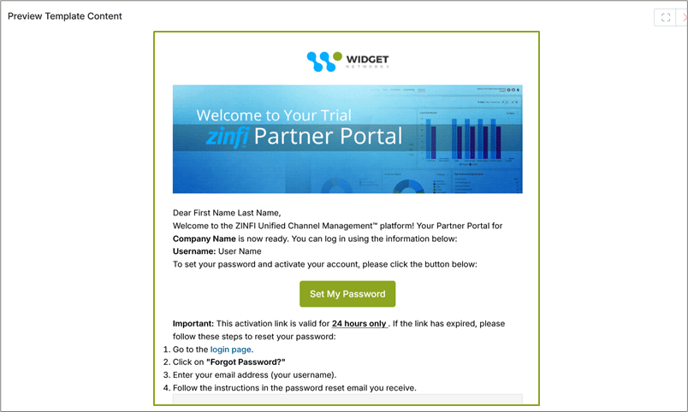
- The preview supports multilingual templates, continuing ZINFI’s commitment to global compatibility.
- Actual record values are not shown in the preview. Instead, field labels are used to represent where dynamic values will appear during actual delivery. This is because, at preview time, the system doesn’t reference a specific record.
Origin of Feature
Customer request. The feature is designed to improve the user experience by allowing users to preview system email templates.
CX Strategy Relation (6 S’s)
Scalability
Portal User-Facing Benefits
This feature allows Admins to preview system email templates with field labels replacing dynamic placeholders before sending.
______________________________________________________________________________________
Approval Workflow for Incentive Rules
Related Application(s)
Market Development Funds Management, Commissions Management, Rebates Management
Feature Description
To address auditability and accuracy in incentive calculations, ZINFI has introduced a configurable Approval Workflow for the Incentive Rules Engine. This enhancement ensures that incentive rule calculations are only performed on approved rule sets, eliminating inconsistencies arising from mid-cycle edits or unapproved changes. This feature applies across all rule types, including MDF, Rebates, and Commissions.
- Previously, any admin user with access to the Incentive Rules Engine could:
- Create and edit rules at any time, including mid-quarter or post-calculation.
- Apply rule changes uncontrolled, which led to calculation inconsistencies across records within the same cycle.
- With the new enhancement, an out-of-the-box approval workflow is now embedded into the Incentive Rules Engine. This workflow ensures that:
- Only approved rules are used for incentive calculations.
- Newly created rules remain Pending Approval until an authorized approver takes action.
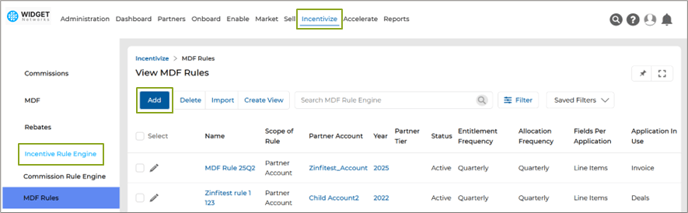
- Navigate to the MDF Rules under Incentive Rule Engine.
- Create a new MDF Rule by clicking Add button.
- Create the Rule by providing the required attributes and Click Save.
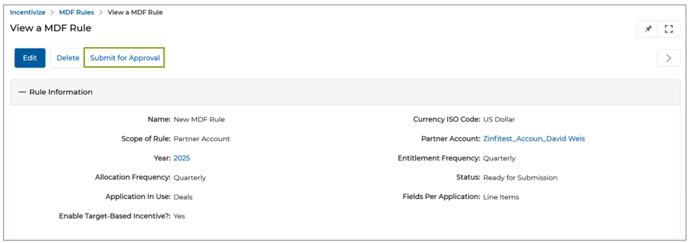
- Submit the Rule for Approval.
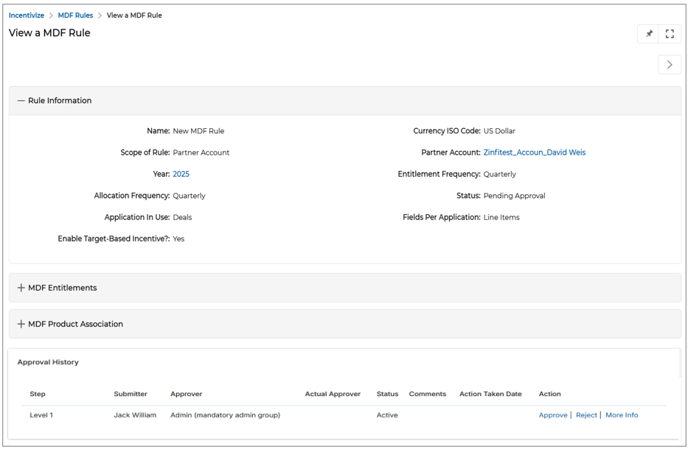
- Approver users will review and Approve/Reject the rule.
- Only after approval will the rule be eligible for use in incentive calculations.
Origin of Feature
Customer request. This feature allows Admins to configure incentive rules without setting any mandatory targets.
CX Strategy Relation (6 S’s)

Portal User-Facing Benefits
This feature allows Admins to configure incentive rules for Partners without setting any mandatory targets.
______________________________________________________________________________________
Badge Template Management
Related Application(s)
Partners Profile Management
Feature Description
A new capability has been introduced within the Badges application as part of ZINFI’s ongoing efforts to improve automation and streamline partner asset delivery. This enhancement allows administrators to dynamically configure and distribute badge templates based on partner tier and regional assignment.
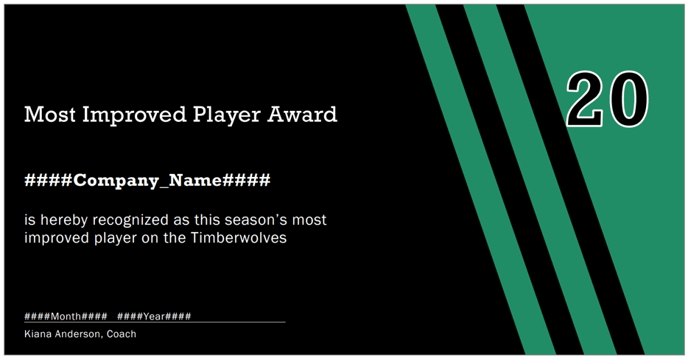
Administrators can now upload badge templates for specific tier-region combinations. These templates are then automatically surfaced to eligible partner users under their My Account section for download. This eliminates manual file sharing and ensures each partner receives a personalized badge aligned with their tier and region.
- Navigate to the Badges from Partners.
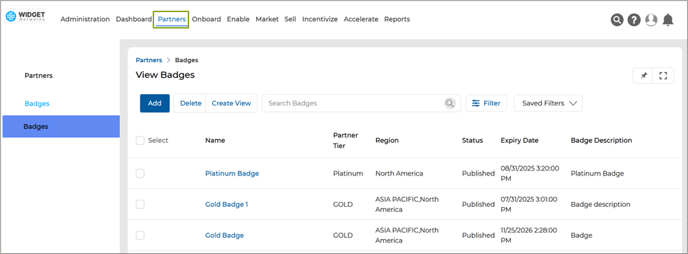
- Click Add to create a new Badge.
- Provide the following:
- Badge Name
- Tier
- Region
- Expiry Date
- Description
- Set Status to Published (only published badges are visible to partners)
- Upload a badge template file
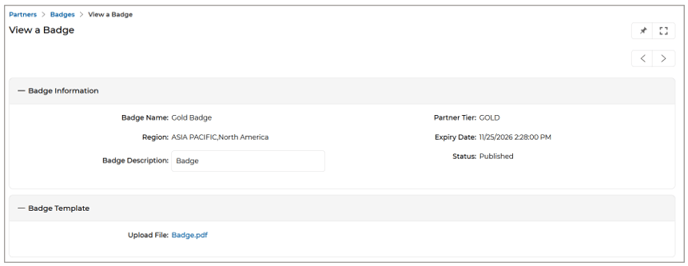
- Click Save to initiate processing via the scheduler.
- *A scheduler runs every five minutes to update partner-tier-region mapping and make the relevant badge templates visible to eligible partners.
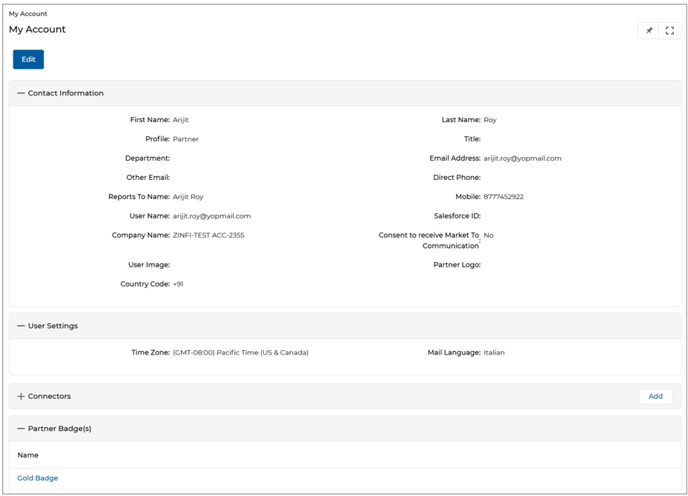
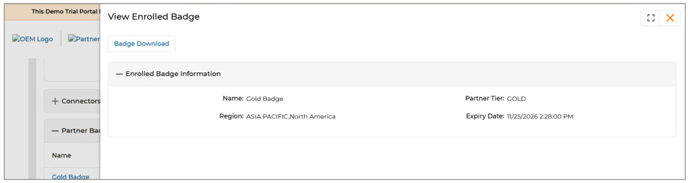
- Partner users can then log in and download their assigned badge from the My Account > Partner Badges section.
Dynamic Hash Code Support in Badge Templates
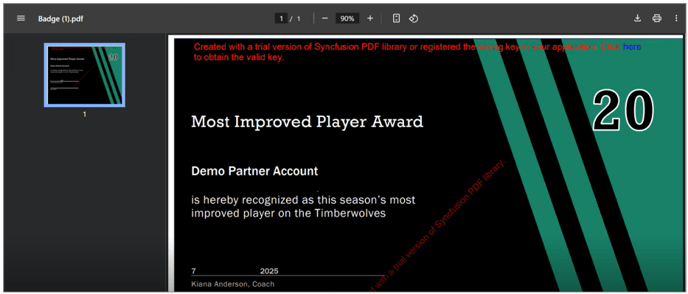
- Badge templates can include dynamic hash codes (e.g.####CompanyName####, ####DownloadDate####) for personalized rendering.
- These hash codes are dynamically populated at the time of badge generation, ensuring that each downloaded badge displays the partner’s specific details and relevant metadata based on their user profile.
- Only relevant values from the Users application are used, ensuring simplicity and accuracy.
For Partners:
- Log in to the partner portal of UPM.
- Go to My Account > Partner Badges.
- The system will display the badge template assigned based on the partner’s tier and region.
- Click Download to retrieve the personalized Badge file.
Origin of Feature
Customer request. The feature is designed to automate personalized badge management based on partner tier and regional mapping.
CX Strategy Relation (6 S’s)

Portal User-Facing Benefits
This feature enables Admins to auto-distribute personalized badge templates by tier and region, while Partners can easily download their assigned badges with dynamic details.
______________________________________________________________________________________
Universal Date-Time Picker
Related Application(s)
Generic
Feature Description
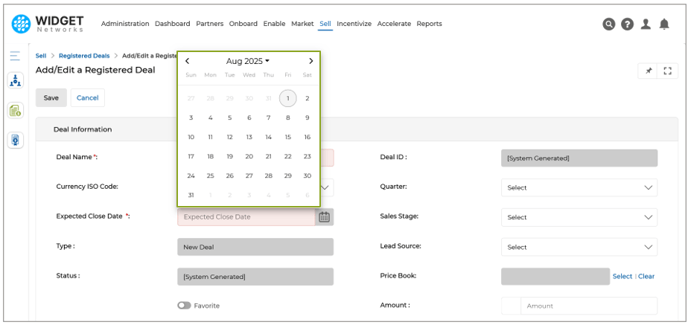
We have introduced a unified Date-Time Picker component to improve filtering precision across the UPM platform. This enhancement enables users to select both date and time simultaneously from a single interface, eliminating the limitations of the earlier date-only picker.
This update's more intuitive and responsive UI ensures a consistent user experience when applying filters or configuring date–time–based criteria in platform modules.
- The previous calendar popup allowed users to select only the date (shown in the below image), restricting time-based filtering.
- The new Date-Time Picker enables selecting both date and time in one seamless step.
- Users can:
- Navigate across years and months using arrow controls.
- Choose a specific day from the calendar.
- Select or type the exact time (e.g., 12:00 AM) using manual input or arrow buttons.
- After clicking Set, the combined date and time value is applied instantly in the target field.
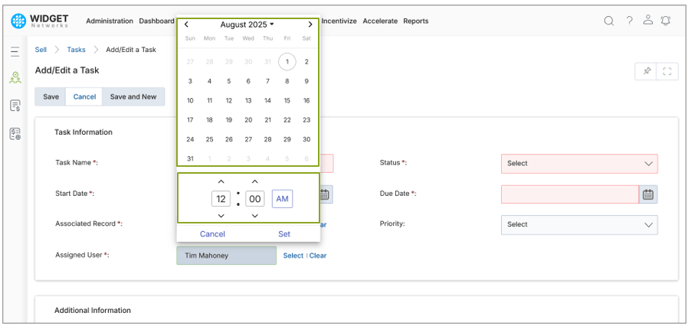
- This new unified picker replaces the legacy date-only calendar UI across all relevant areas of the platform.
Origin of Feature
Customer request. The feature is designed to standardize and simplify date-time input across the platform by introducing a unified picker that allows users to select both date and time from a single interface.
CX Strategy Relation (6 S’s)

Portal User-Facing Benefits
This feature enables users to select both date and time in a single step from a unified date-time picker.
______________________________________________________________________________________
Primary Button (CTA) Configuration for Card and Template Layouts
Related Application(s)
Generic
Feature Description
To bring consistency and flexibility to action button behavior across different layout types in UPM, we have introduced support for primary and collapsible button configurations in Card and Template layouts. This enhancement aligns the button configuration experience in these layouts with existing capabilities in list page layouts, enabling admins to visually define button priority, structure, and behavior through Workflow.
This feature ensures that both desktop and mobile views support configurable button actions with consistent styling and logic.
- Card and Template layouts, used in applications like Content Library, Courses, and Certifications, now support primary button settings via Workflow.
- Two types of buttons exist in these layouts:
- Top-level action buttons (e.g., Add, Delete, View All) affecting the full entity/application.
- Record-level buttons (e.g., Info, View, Visibility) tied to individual records – these remain unchanged.
- Admins can now:
- Designate one button as the primary button, which will be visually highlighted (blue by default).
- Add supporting buttons as dropdown options under the primary action.
- Use UI logic, button order, and visibility rules for more refined control.
- Apply the same button behaviour to mobile views, ensuring responsive consistency.
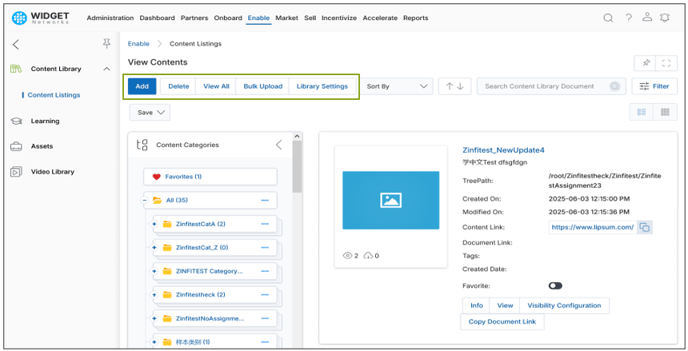
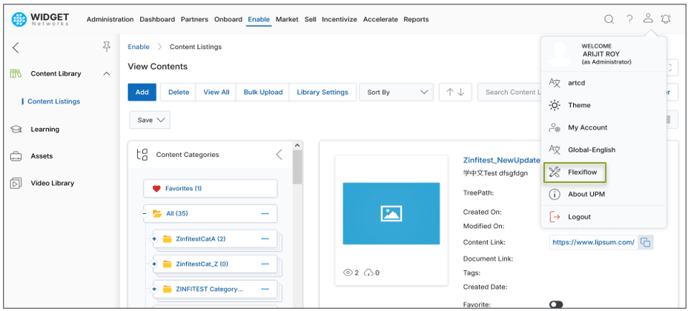
- Log in to the UPM as an Admin and navigate to Content Library > Workflow.
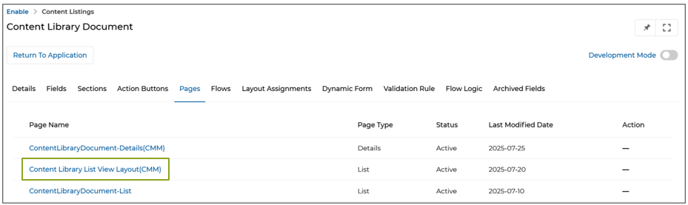
- Go to Pages > Content Library List View Layout(CMM) and go to the configuration page.
- Under the List Buttons section:
- Click Create & Configure Button.
- A side panel will appear with button settings.
- From here, set your primary button, choose collapsible options, and apply logic and styles as needed.
- Use the Save or Reset options to finalize or discard configuration changes.
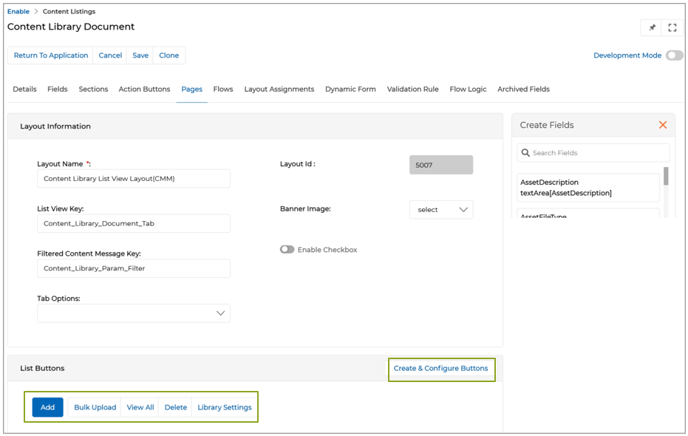
- Admins can configure one button as each page's “Primary” action. Only one button can be marked as Primary at a time. If another button is selected, the system alerts the admin that only one primary button is allowed.
- The primary button is visually distinct and blue to indicate the main action expected from the user.
- Less frequently used buttons (e.g., “Delete,” “Export,” “View,” “Edit,” etc.) can be placed inside a collapsible dropdown menu by enabling the “Dropdown Link” toggle button.
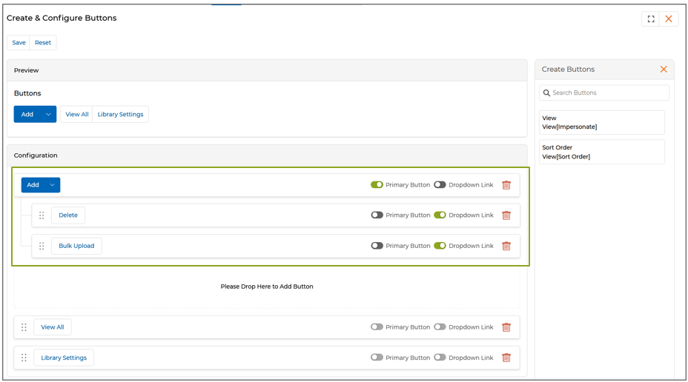
- A real-time preview panel reflects changes instantly, helping admins visualize the final UI before saving.
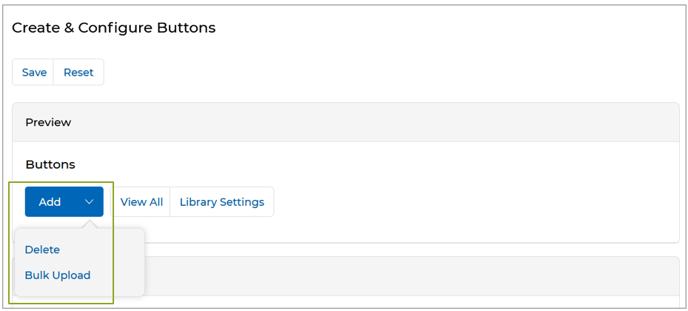
Origin of Feature
Customer request. The feature is designed to align Card and Template layouts with list page behavior by enabling primary and collapsible button configuration through Workflow.
CX Strategy Relation (6 S’s)

Portal User-Facing Benefits
This feature enables admins to configure primary and collapsible action buttons in Card and Template layouts via Workflow.
______________________________________________________________________________________
Featured Light UI/UX Upgrade and Field Label Alignment Enhancements
Related Application(s)
Generic
Feature Description
As part of the ongoing efforts to modernize the user experience, the 25.3 platform release introduces a new Light UI theme and left-aligned field layout. This update significantly improves visual clarity, usability, and screen space utilization across the portal.
Both enhancements are enabled by default but can be toggled off by users who prefer the previous layout, allowing for a smooth transition and full customization.
- A new Light UI design is now available across the portal interface.
- Key improvements include:
- Cleaner layout with reduced clutter.
- Updated icons and more spacious font styling.
- Improved readability and faster visual scanning of information.
- This design replaces the legacy interface as the default view for all users.
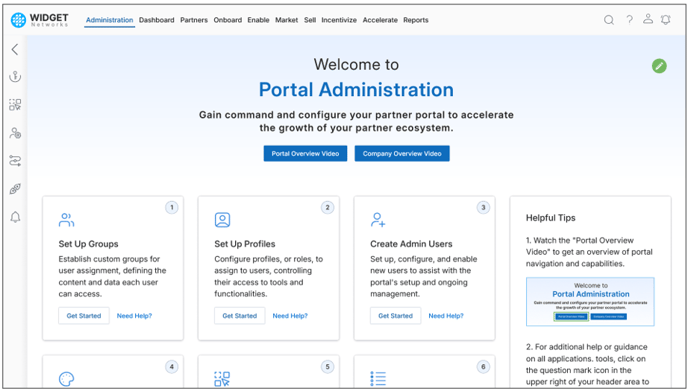
Left-Aligned Field Labels
- All field labels shown in record-level views (e.g., Partner Contact details) are now left-aligned by default.
- This change enhances readability and optimizes use of horizontal space across sections and applications.
- Previously, fields were center-aligned, leading to inconsistent alignment and dense layouts.
- The new alignment provides a more structured and modern layout throughout all applications.
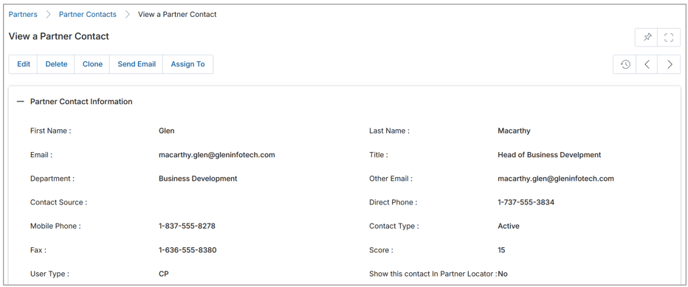
*Note: For users who prefer the previous version, an option to revert to the classic UI is available under CMS > Portal Identity > Portal Theme Options.
Access and Configure
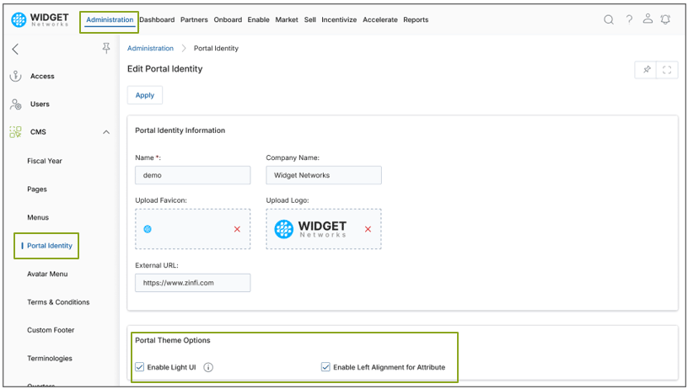
- Navigate to CMS > Portal Identity.
- Under Portal Theme Options, two new configuration checkboxes are available:
- Enable Light UI – toggles the modern UI theme.
- Enable Left Alignment for Attributes – controls alignment of field values in record views.
- By default, both checkboxes are enabled.
- Admin users can uncheck one or both to revert to the legacy view and layout behavior.
Origin of Feature
Customer request. The feature is designed to modernize the portal interface by introducing a cleaner Light UI theme and left-aligned field layout.
CX Strategy Relation (6 S’s)

Portal User-Facing Benefits
This feature provides Admins and Partners with a cleaner interface through a modern Light UI theme and improves readability by left-aligning field values across all record views.
______________________________________________________________________________________
Bulk Operation Logs in My Account
Related Application(s)
My Account
Feature Description
To improve traceability and user awareness around large-scale data actions, a new Bulk Operation Log section has been introduced in the 25.3 release, accessible from the My Account area. This feature captures system logs related to bulk import and export operations, providing visibility into their status, associated files, and detailed error insights.
Centralized Visibility into Import/Export Activities
- The feature is accessible to all users via the Avatar icon > My Account > Logs. The new “Logs” shortcut has been added under the My Account menu.
- Clicking on this opens the View Logs page, displaying recent bulk operations.
- Currently supported operation types:
- Import/Bulk Upload.
- Export.

Log Fields
- Type - Indicates if the operation was an Import or Export.
- Application - Specifies the application (e.g., Partners, Prospects) where the operation occurred.
- Status - Specifies the module (e.g., Partners, Prospects) where the operation occurred.
- Uploaded File - For successful imports, a download link is provided for the uploaded file. For Errors, remains blank.
- Action - For failed imports, includes a Details hyperlink that redirects to the Background Job Detail page showing exact errors.
Origin of Feature
Customer request. The feature is designed to improve transparency of bulk operations by introducing a centralized log section under My Account, allowing users to track import/export status, access uploaded files, and review error details.
CX Strategy Relation (6 S’s)

Portal User-Facing Benefits
This feature gives Admins a centralized view of their bulk import and export activities via a new Logs section under My Account, improving traceability, error visibility, and file access.
______________________________________________________________________________________
Power BI Dashboard Embedding
Related Application(s)
Business Intelligence Reports
Feature Description
With the 25.3 platform release, Admin users can now embed live Power BI dashboards directly into the UPM portal using the Report Configuration module. This enhancement builds on existing third-party embedding capabilities by allowing seamless integration of dashboards from organizational Power BI workspaces, enabling faster decision-making through in-app access to real-time insights. Admins can now configure access to Power BI dashboards and associate them with the appropriate menus and user groups for seamless in-app access and visibility control.
Earlier, UPM supported embedding only third-party reports via the Report Configuration application. Dashboards from external sources like Power BI were not directly embeddable into the portal. This limited the visual reporting experience to static or less interactive report formats. There was no interface-level support for selecting and configuring Power BI dashboards.
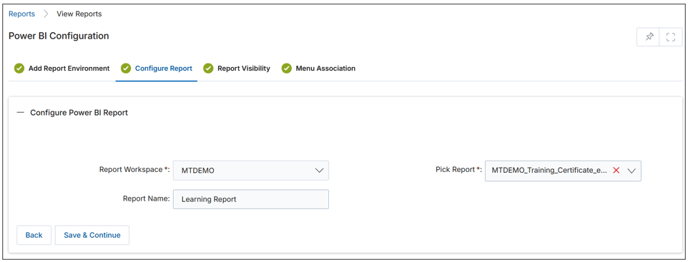
With the new enhancement, available from version 25.3, admins can now:
- Use the Report Configuration interface to embed Power BI dashboards in addition to third-party reports.
- Key improvements include:
- Dedicated option to select “Dashboards” during report setup.
- Support for both internal and customer-facing environments.
- Visibility and menu placement settings retained from previous report configuration flow.
- Embedded dashboards load securely within the portal, eliminating the need to navigate externally.
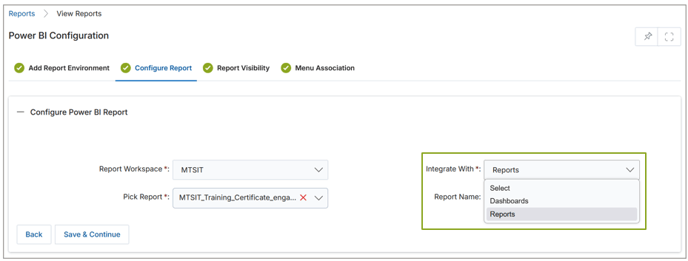
- Go to Reports > Report Configuration.
- Click “Add” to start a new embedding setup.
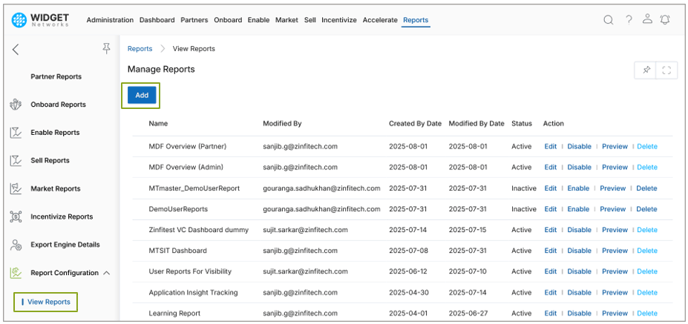
- Choose the environment (e.g., ZINFI Internal or Customer).
- Select a Power BI workspace.
- Pick “Dashboards” from the Integrated With dropdown menu.
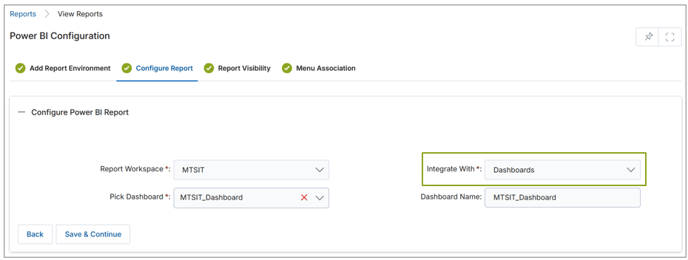
- Choose the dashboard and configure visibility settings.
- Set the left menu location where the dashboard will appear.
- Click “Save” to complete the setup.
Flexible User Experience with Revert Option
- Admins can integrate reports or dashboards as needed.
- Workspace selection dynamically displays available Power BI content.
- Dashboard reuse is controlled to prevent duplicate embedding of the same asset.
- Visibility settings allow for fine-grained access control.
Origin of Feature
Customer request. The feature is designed to enhance reporting capabilities in the portal by enabling Admins to embed Power BI dashboards.
CX Strategy Relation (6 S’s)

Portal User-Facing Benefits
This feature allows Admins to embed Power BI dashboards directly into the portal via the Report Configuration shortcut.
______________________________________________________________________________________
Lookup-Based Filtering in Advanced Search
Related Application(s)
Generic
Feature Description
As part of the 25.3 platform release, an enhancement has been introduced in the Advanced Filter functionality to support filtering based on lookup fields. This update allows users to perform complex record searches using attributes from related applications, providing deeper control over data segmentation and improving usability in multi-object relationships.
Previously, users could only filter based on fields within the current module. With this release, they can now select lookup objects and apply filter conditions on their associated fields, supporting broader use cases such as identifying contacts whose accounts were created during a specific time period.
- Navigate to any module (e.g., Partner Accounts).
- Click on Filter and select Advanced.
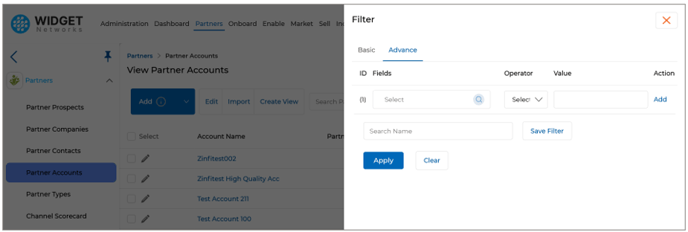
- In the search bar, choose either the current application or a lookup application.
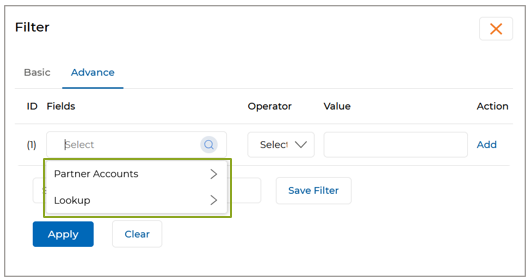
- Once a lookup application is selected:
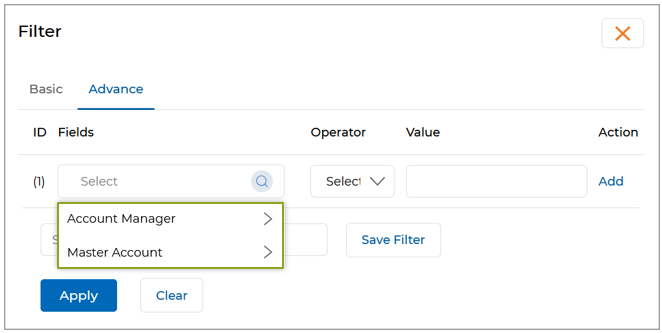
- A list of its searchable fields will appear.
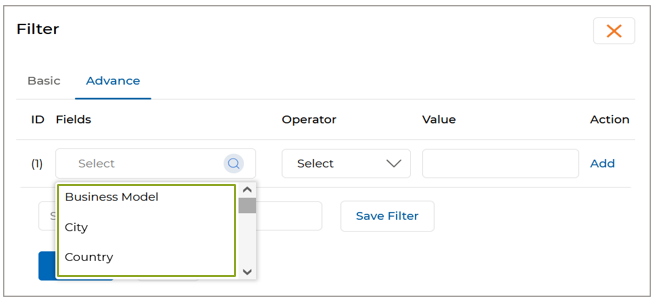
- Apply desired filter conditions and values.
- Click Apply to execute the filter and view matching records.
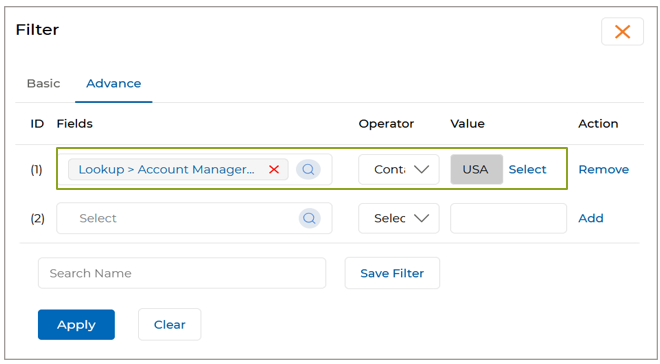
- A list of its searchable fields will appear.
Origin of Feature
Customer request. The feature is designed to improve search precision within the portal by enabling lookup-based filters in Advanced Search.
CX Strategy Relation (6 S’s)

Portal User-Facing Benefits
The feature enhances search precision across the portal by enabling Admins and Partners to filter records using lookup-based criteria within Advanced Search.
______________________________________________________________________________________
Mandatory Region Association and Abbreviation Enforcement in Country Master
Related Application(s)
Access Management
Feature Description
As part of ongoing efforts to ensure data consistency and maintain region-based compliance across global records, we have enhanced the Country Master application with stricter validation and improved mapping integrity.
Previously, countries could be added without a defined region or complete abbreviation data, leading to inconsistencies in integrations and reporting. With this release, we’ve introduced mandatory region tagging and enforced the presence of both two-letter and three-letter country abbreviations to address these issues.
- Navigate to Administration > Access > Countries.

- Click Add or Edit an existing country.
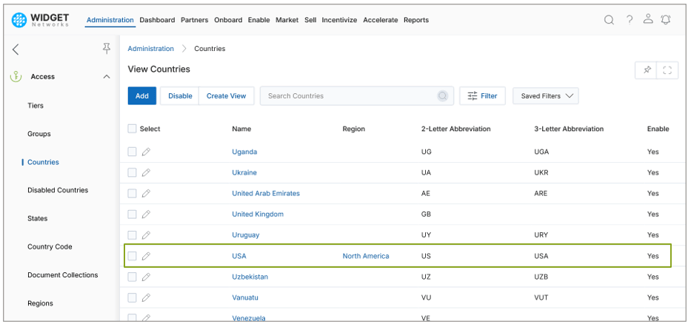
- Select Region and provide 2-Letter Abbreviation and 3-Letter Abbreviation and save the record.
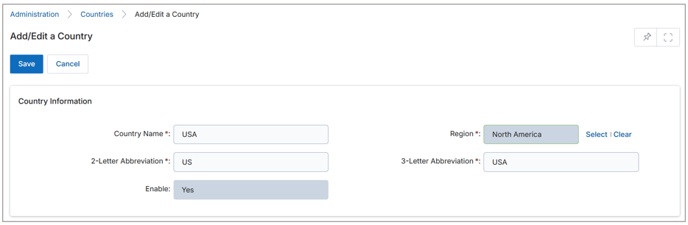
- Mandatory Region Tagging
- Every country added or edited must now be associated with a specific region.
- This enforces a strict one-to-one relationship, ensuring that a country cannot be left without regional classification or be linked to multiple regions unintentionally.
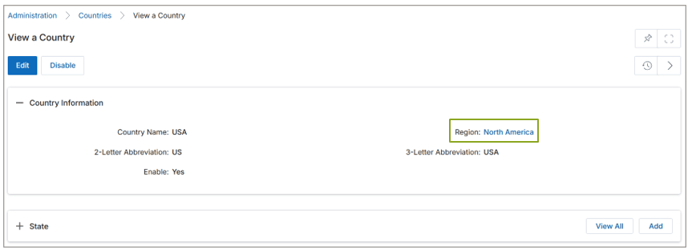
- Enforced Abbreviation Fields
- The system now requires valid ISO-standard two-letter and three-letter abbreviations for every country.
- These abbreviations are critical for downstream processes, including CRM synchronization and third-party data exchanges.
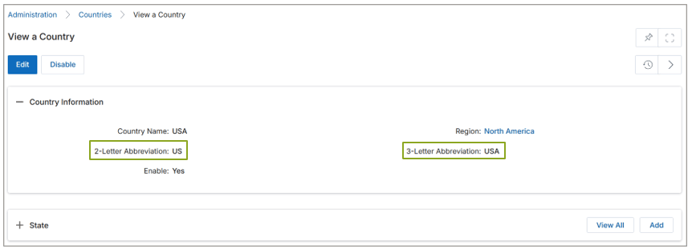
Note: All existing country records have been updated to include valid region associations and abbreviation codes to maintain continuity and data accuracy across the platform.
Origin of Feature
Customer request. The feature is designed to ensure accurate country-to-region mapping and enforce standardized abbreviations in the Country Master configuration.
CX Strategy Relation (6 S’s)
Security
Portal User-Facing Benefits
This feature allows Admins to maintain standardized country records in the Country Master by enforcing mandatory region association and requiring two-letter and three-letter country abbreviations for each entry.
______________________________________________________________________________________
Mandatory Country Code Configuration across Applications
Related Application(s)
Access Management
Feature Description
To ensure standardization of contact records and improve international communication, full integration of country dial codes has been introduced across key applications. With this update, all phone numbers throughout the platform are now accompanied by the appropriate country codes.
- Navigate to Administration > Access > Country Code.
- The whole list of countries with Country Codes and International Dialing Codes will be visible.
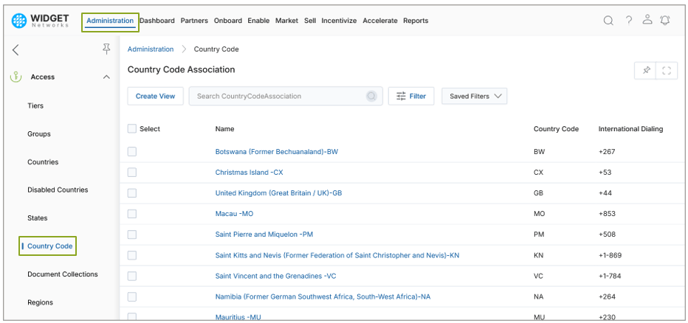
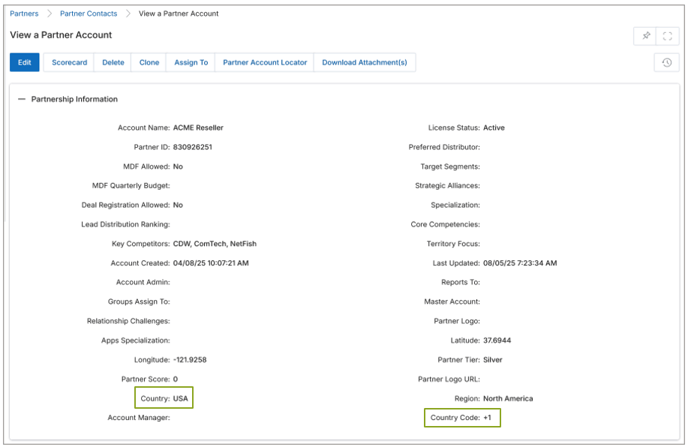
- A new dropdown field has been added for selecting country dial codes (e.g., +1 for USA, +91 for India).
- This dropdown appears in Partner Contacts, Contacts, Partner Accounts, Accounts, and User applications.
- Users must now explicitly choose the correct country code while entering or updating a phone number.
- This eliminates ambiguity and ensures consistent formatting of contact records.
Origin of Feature
Customer request. The feature is designed to enhance the user experience of managing contact records across UPM by introducing standardized country code selection.
CX Strategy Relation (6 S’s)

Portal User-Facing Benefits
This feature enables Admins to standardize phone number entries across the portal by incorporating country dial codes.
______________________________________________________________________________________
Country-Region Mapping with Abbreviation Support
Related Application(s)
Access Management
Feature Description
To improve transparency and ensure complete regional mapping, we’ve enhanced the Region application to display complete country abbreviation details alongside their mappings.
Previously, users had to navigate to the Country Master separately to verify ISO abbreviations. Now, the Region application offers a consolidated view, streamlining data verification and administrative workflows.
- The region listing now displays both two-letter and three-letter country abbreviation codes for each mapped country.
- Navigate to Administration > Access > Regions.
- Click the desired Region and view the associated list of Country(s) with the Region.
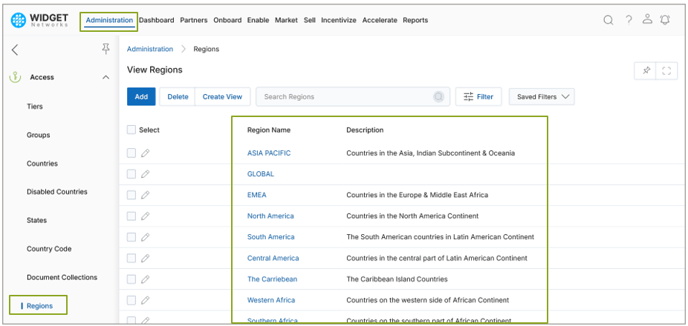
- This gives users immediate visibility into standardized identifiers without toggling between applications.
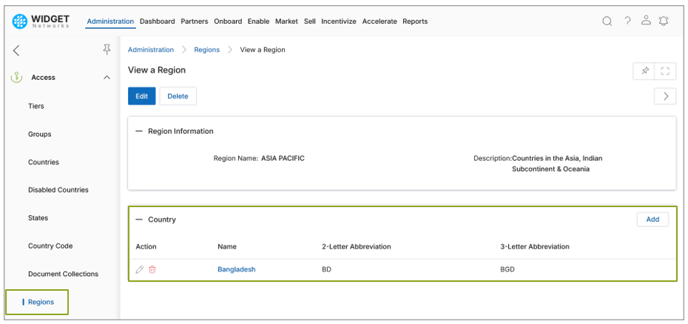
- Administrators can easily verify if countries are correctly configured and associated within their respective regions.
- Enhances data readiness for integrations and reporting dependent on ISO-standard country codes.
Origin of Feature
Customer request. The feature is designed to enhance the user experience of viewing and managing country-to-region relationships in UPM by introducing an integrated view of country names and their two-letter and three-letter abbreviations within the Region application.
CX Strategy Relation (6 S’s)

Portal User-Facing Benefits
This feature allows Admins to configure standardized country details directly within the Region module, such as 2-letter and 3-letter abbreviation codes.
______________________________________________________________________________________
Email Notification for Bulk Assets Uploaded in a Time Frame
Related Application(s)
Co-Branded Assets Management
Feature Description
The Email Notification for Assets feature automatically sends an email alert for all assets uploaded within a defined time frame. Admin users can configure notification settings and email templates so that partners receive consolidated updates on newly uploaded assets. These notifications include direct links to the published assets in the specific time period, enabling partners to access and co-brand them without additional navigation.
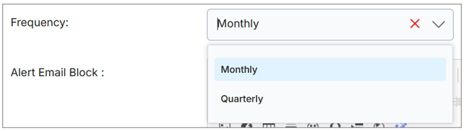
Admins can define the notification frequency as monthly or quarterly, ensuring that partners are informed at the end of each selected period about all the assets published during that time.
- In the Notification Settings section, the Admin configures an alert for the Assets application with the action set to “Record Creation.”
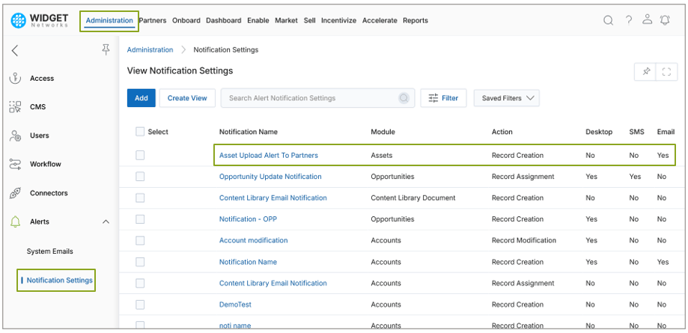
- The Admin enables the email toggle and selects or customizes an email template for the notification.
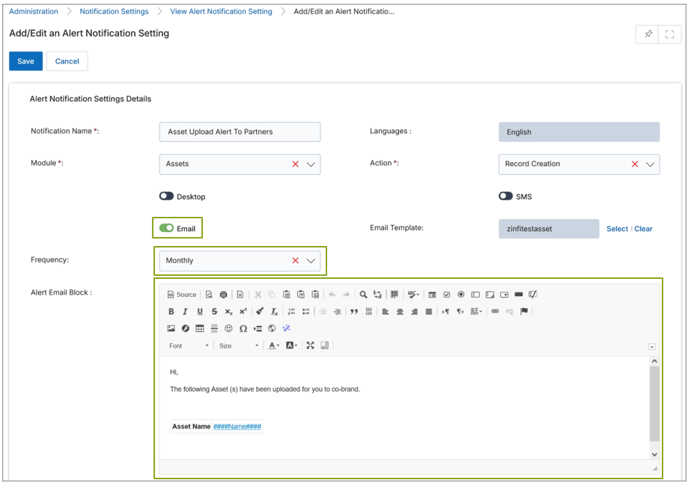
- Partners receiving the email can view a clickable Name Link for each asset, allowing them to land directly on the corresponding asset details page.
- If the Admin selects a monthly frequency, partners receive an email listing all assets published within that month on the last day of the month.
- If the Admin selects a quarterly frequency, partners receive an email on the last day of the quarter listing all assets published.
Origin of Feature
Customer request. This feature ensures partners are automatically notified about new assets uploaded in a defined period, eliminating the risk of missed updates and reducing manual communication.
CX Strategy Relation (6 S’s)

Portal User-Facing Benefits
This feature helps Partners by providing a consolidated update of assets published within a month or quarter. With direct links included in the email, Partners can immediately access and co-brand assets, improving efficiency and ensuring they stay up to date without needing to manually check the portal.
______________________________________________________________________________________
Rebates Projection
Related Application(s)
Rebates Management
Feature Description
The Rebate Projection feature gives Admins early visibility into the rebate payouts expected for partners in the upcoming month or quarter. Previously, rebate amounts could only be realized after completing the actual rebate calculation and payout cycle. With this enhancement, Admins can now view projected rebate amounts based on sales data and invoices already uploaded by partners, allowing them to anticipate and plan for upcoming payouts.
The projection logic leverages the same rules and calculations used by the Incentive Rules Engine for final rebate payouts, ensuring accuracy and consistency. Projections are updated dynamically via configured schedulers as new invoice data is uploaded, giving Admins a real-time estimate of potential partner rebates.
- A new Rebate Projection application is available within the Rebates application.
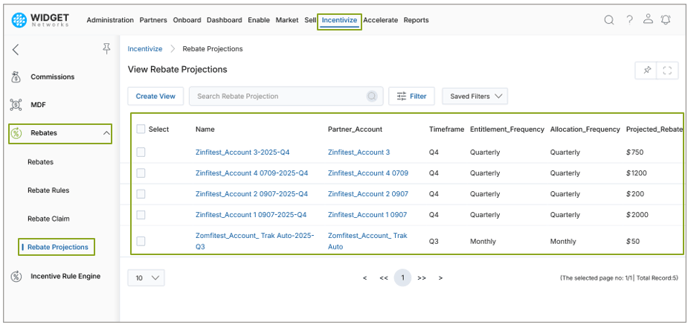
- Projections are calculated using the same rules defined under Rebate Rules in the Incentive Rules Engine. For example, if a rebate rule is set to a monthly frequency, the system will display a projected rebate amount for the current month based on invoices uploaded to date.
- For quarterly rules, the system displays expected payouts for the upcoming quarter, based on sales data from the current quarter. The projection values automatically update as additional invoices are uploaded during the period.
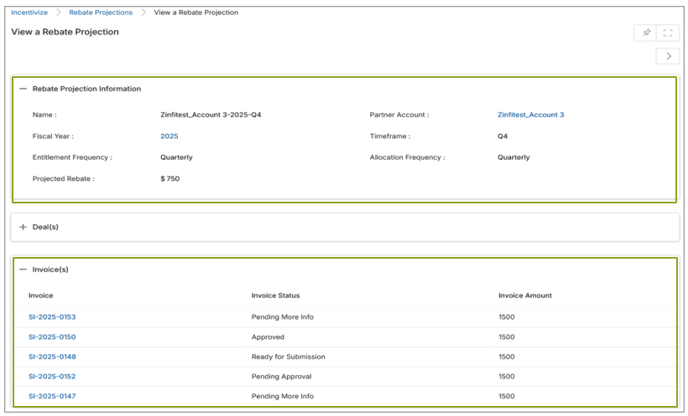
- On the details page, Admins can view projections for specific partner accounts, including invoice data used for the calculation and the corresponding projected rebate amount.
Origin of Feature
Customer request. This feature allows Admins to forecast rebate payouts in advance, providing greater financial visibility and enabling proactive decision-making.
CX Strategy Relation (6 S’s)

Portal User-Facing Benefits
This feature helps Admins by offering an accurate, real-time view of projected partner rebate payouts. By eliminating the need to wait until the official payout cycle, Admins can plan budgets, manage partner expectations, and ensure transparency in incentive management.
______________________________________________________________________________________
Auto-Completion of Asset Task Requirements
Related Application(s)
Partner Programs Management
Feature Description
The enhanced Asset Task Type functionality introduces backend logic that automatically marks asset-related task requirements as complete once predefined conditions are met.
A new task type named Asset has been added under Program tasks, allowing admins to define requirements linked to published assets. A new field – Completion Criteria – has been added to this task type under Task Requirement Details. This dropdown provides two options: Asset Co-branded and Asset Approved. Based on the selected option, the system automatically updates the task status when the corresponding action occurs.
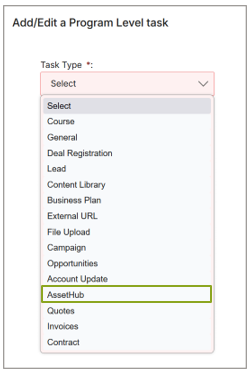
- When Asset Co-branded is selected, the task requirement is automatically completed once the partner saves the co-branded asset.
- When Asset Approved is selected, the task requirement is automatically completed once the approver approves the asset.
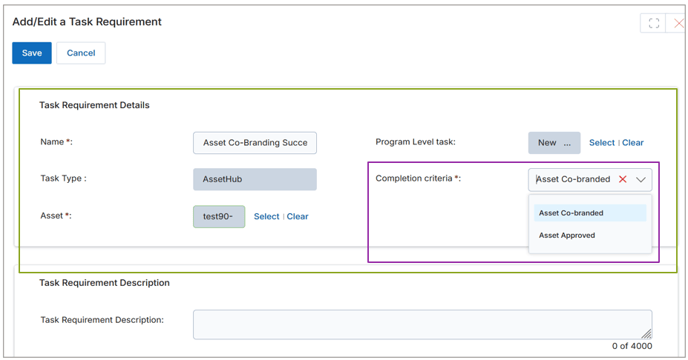
This backend-driven automation reduces manual updates, increases efficiency, and provides accurate progress tracking for program-related activities.
Origin of Feature
Customer request. This feature enhances backend logic to automatically complete asset-related task requirements when assets are cobranded or approved, eliminating the need for manual task updates.
CX Strategy Relation (6 S’s)

Portal User-Facing Benefits
This feature is designed for Admins and Partners. It enables asset-related program tasks to be automatically completed when associated assets are cobranded or approved. Leveraging backend logic reduces manual effort, prevents task delays, and accurately reflects program progress across all countries and languages supported in the portal.
______________________________________________________________________________________
Auto-Completion of Content Library Task Requirements
Related Application(s)
Partner Programs Management
Feature Description
The enhanced Content Library Task Type functionality introduces backend logic that automatically marks content-related task requirements as complete once predefined user actions are performed.
Under program tasks, a new task type named Content Library has been added, allowing admins to define requirements linked to published content. Within this task type, a new field, Completion Criteria, has been added under Task Requirement Details. This dropdown provides three options: Content Viewed, Content Downloaded, and Content Shared. Based on the selected option, the backend logic ensures that the system automatically updates the task status when the corresponding action occurs.
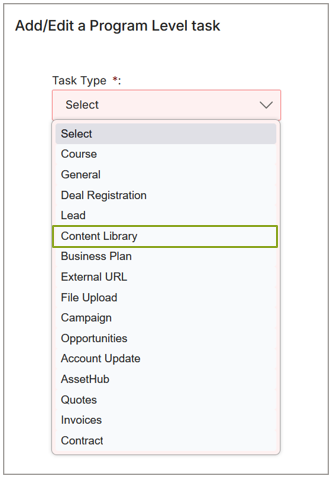
- When Content Viewed, Content Downloaded, or Content Shared is selected, the task requirement is automatically completed once the user views, downloads, or shares the content, respectively.
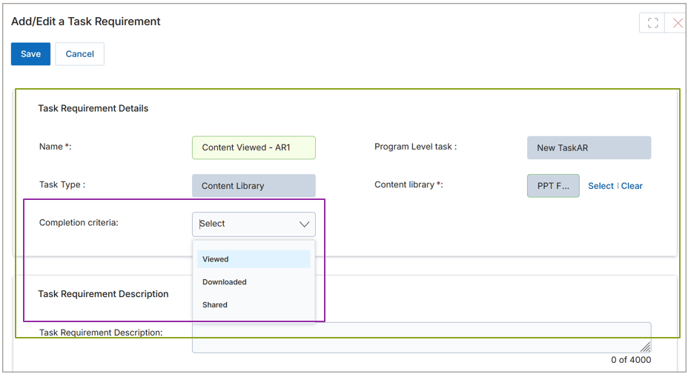
This feature simplifies program task management, improves accuracy, and reduces dependency on manual updates by ensuring content tasks are automatically tracked through backend enhancements.
Origin of Feature
Customer request. This feature enhances backend logic to automatically complete content-related task requirements when content is viewed, downloaded, or shared, eliminating the need for manual task updates.
CX Strategy Relation (6 S’s)

Portal User-Facing Benefits
This feature is designed for Admins and Partners, enabling content-related program tasks to be automatically completed when associated content is viewed, downloaded, or shared. By leveraging backend logic, it reduces manual effort, prevents task delays, and ensures an accurate reflection of program progress across all countries and languages supported in the portal.
______________________________________________________________________________________
Autocomplete Contract Task Requirements
Related Application(s)
Partner Programs Management
Feature Description
The Autocomplete Contract Task Requirements feature introduces a new task type, Contract, within Program-level task requirements. This enhancement ensures that contract-related tasks are automatically marked as complete once the associated contract reaches the Signed status, streamlining program workflows and improving accuracy.
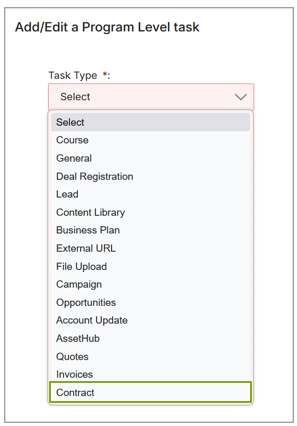
- A new Contract task type has been added to replace the earlier “Terms and Conditions” task type.
- Both digitally signed contracts (via system-supported e-signature flow) and manually signed contracts (status updated by Admin/system process) are supported.
- If a selected contract is set to expire within 30 days, a soft validation message is shown: “The selected contract is set to expire within the next 30 days. Once expired, partners will no longer be able to view it. Please ensure this contract is still appropriate for your program task.”
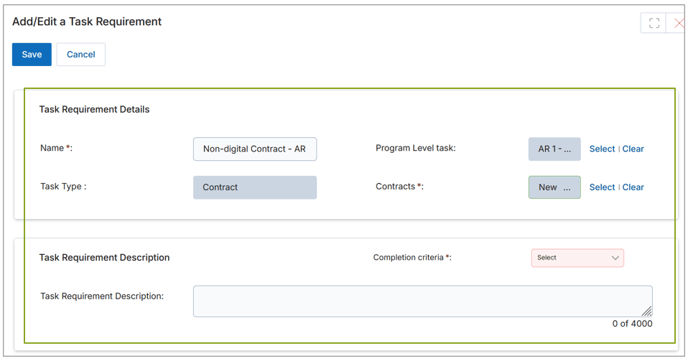
This backend-driven automation reduces manual updates, increases efficiency, and provides accurate progress tracking for program-related activities.
Origin of Feature
Customer request. This enhancement adds automation and validation to contract-related tasks, ensuring accuracy while reducing manual intervention.
CX Strategy Relation (6 S’s)

Portal User-Facing Benefits
This feature benefits both Admins and Partners by automating task completion for contract-related tasks when contracts are signed.
______________________________________________________________________________________
Auto-Completion of Deal Registration Task Requirements
Related Application(s)
Partner Programs Management
Feature Description
The Autocomplete Task – Deal Registration feature streamlines task tracking by automatically marking tasks as completed once partners meet predefined deal-based requirements within a Program. Admins can configure these tasks with flexible criteria based on either the number of deals registered or the total revenue generated. The system continuously monitors approved deals and updates task status without requiring manual intervention, ensuring accuracy and efficiency in partner performance tracking.
This backend-driven automation reduces manual updates, increases efficiency, and provides accurate progress tracking for program-related activities.
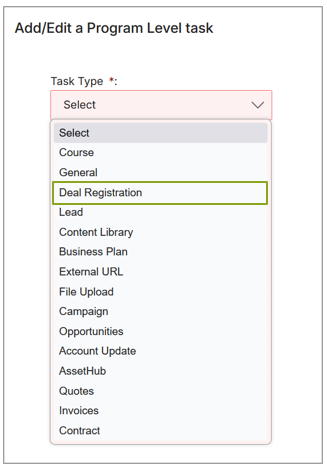
- Admins can now create tasks under a Program and select Deal Registration as the task type.
- A new Criteria Type field is available during task setup, allowing Admins to select from:
- Deal Count – Requires partners to register a specified number of deals. Once the number of approved deals registered by the partner equals or exceeds the specified count, the task is auto-completed.
- Deal Revenue – Requires partners to achieve a specified cumulative deal value. Once the cumulative value of approved deals registered equals or exceeds the specified revenue, the task is auto-completed.
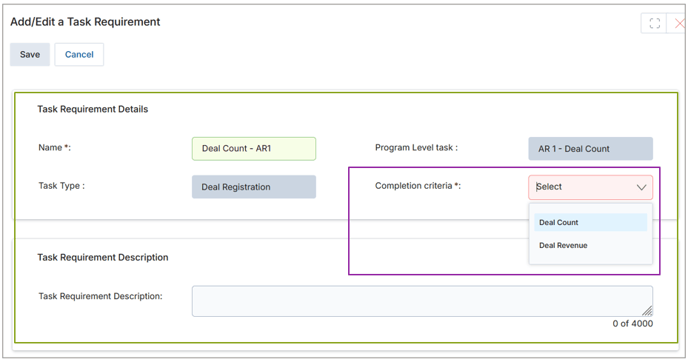
- Only saved and approved deals are considered for task completion.
Origin of Feature
Customer request. This feature provides a seamless way to automatically track and complete deal-related tasks, minimizing manual oversight for Admins and ensuring partners are recognized promptly for meeting requirements.
CX Strategy Relation (6 S’s)

Portal User-Facing Benefits
This feature benefits both Admins and Partners by automating task completion for deal-based requirements.
______________________________________________________________________________________
Fixes and Patches
Email Notification Label Enhancement in Communities
Related Application(s)
Community Management
Feature Description
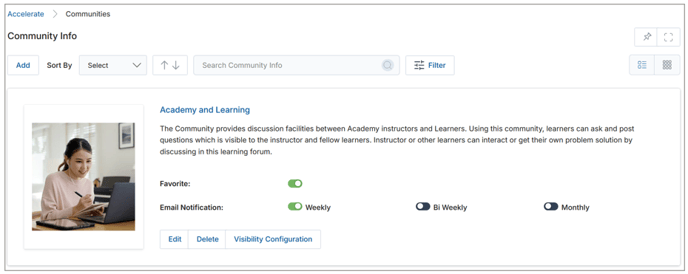
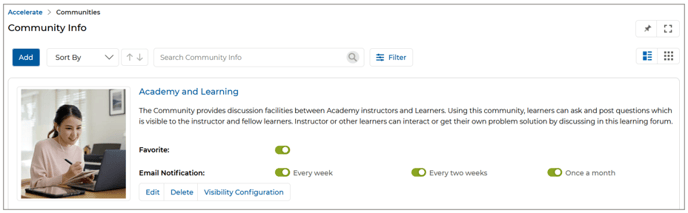
In this minor yet effective UI enhancement, ZINFI has updated the labeling of email notification frequencies within the Community application. Previously, notification options were labeled as Weekly, Bi Weekly, and Monthly. These have now been revised to more user-friendly and grammatically accurate formats: Every week, Every two weeks, and Once a month. This improvement helps ensure better clarity and alignment with standard language expectations for end users.
- Within the Community section, the Email Notification toggle options appeared as:
- Weekly
- Bi Weekly
- Monthly
- The revised toggle labels now read as:
- Every week
- Every two weeks
- Once a month
Origin of Feature
Customer request. The feature is designed to improve label clarity in the Community application by replacing existing email notification frequency terms with more intuitive and grammatically clear phrases.
CX Strategy Relation (6 S’s)
Simplicity
Portal User-Facing Benefits
This enhancement helps both Admins and Partners clearer email frequency labels in Communities for better notification management.
______________________________________________________________________________________
Base Currency Symbol Display Enhancement
Related Application(s)
Generic
Feature Description
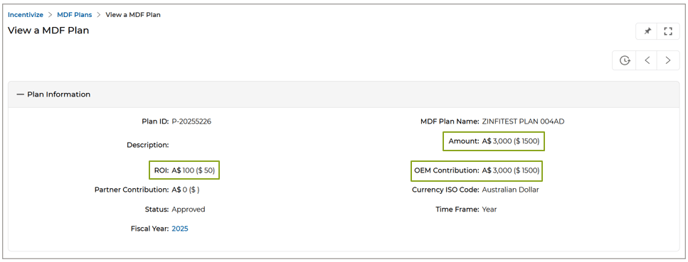
ZINFI has introduced a visual enhancement across the Unified Partner Management (UPM) portal to improve the clarity of base currency representation. Until now, the corresponding currency symbol has not been shown when amounts were displayed alongside base portal currency values (within brackets). This often led to confusion about which currency the base value represented, particularly for users managing multiple international currencies.
With this enhancement, a currency symbol (e.g., $, ₹, ฿) is now consistently displayed before the base currency amount throughout the portal UI. This ensures users can instantly recognize the currency type without ambiguity, enhancing financial transparency across applications.
Previous Labeling
- Currency values were displayed with the amount only in brackets, without the currency symbol. Example, A$100 (50).
- Users were often unable to determine what currency the base value (in brackets) represented, especially when foreign currencies were involved.
Updated Labeling
- The appropriate currency symbol is now shown before the base amount in brackets. A$100 ($50).
- This change is applied portal-wide for all modules displaying base and converted currency values.
Example
Origin of Feature
Customer request. The feature is designed to improve financial clarity across the UPM portal by displaying currency symbols alongside base amounts.
CX Strategy Relation (6 S’s)

Portal User-Facing Benefits
This enhancement enables Admins and Partners to clearly distinguish base currency values across the UPM portal by displaying appropriate currency symbols.
______________________________________________________________________________________
|
Feature Name |
Application(s) |
CX Strategy Relation |
User Type(s) |
|
Unified Fields’ Attributes Configuration Panel |
Workflow Management
|
Simplicity |
Admin |
|
Manage System Email Templates via CMS Editor |
Alerts & Notification Management |
Sufficiency |
Admin |
|
Email Template Preview Feature |
Alerts & Notification Management |
Scalability |
Admin |
|
Approval Workflow for Incentive Rules |
Market Development Funds Management, Commissions Management, Rebates Management |
Security |
Admin |
|
Badge Template Management |
Partners Profile Management |
Sufficiency |
Admin |
|
Universal Date-Time Picker |
Generic |
Simplicity |
Admin, Partner |
|
Primary Button (CTA) Configuration for Card and Template Layouts |
Generic |
Sufficiency |
Admin |
|
Featured Light UI/UX Upgrade and Field Label Alignment Enhancements |
Generic |
Simplicity |
Admin, Partner |
|
Bulk Operation Logs in My Account |
My Account |
Stability |
Admin |
|
Power BI Dashboard Embedding |
Business Intelligence Reports |
Scalability |
Admin |
|
Lookup-Based Filtering in Advanced Search |
Generic |
Sufficiency |
Admin, Partner |
|
Mandatory Region Association and Abbreviation Enforcement in Country Master |
Access Management |
Security |
Admin |
|
Mandatory Country Code Configuration across Applications |
Access Management |
Sufficiency |
Admin |
|
Country-Region Mapping with Abbreviation Support |
Access Management |
Sufficiency |
Admin |
|
Email Notification for Bulk Assets Uploaded in a Time Frame |
Co-Branded Assets Management |
Sufficiency |
Partner |
|
Rebates Projection |
Rebates Management |
Sufficiency |
Admin |
|
Auto-Completion of Asset Task Requirements |
Partner Programs Management |
Sufficiency |
Admin, Partner |
|
Auto-Completion of Content Library Task Requirements |
Partner Programs Management |
Sufficiency |
Admin, Partner |
|
Auto-Completion of Contract Task Requirements |
Partner Programs Management |
Sufficiency |
Admin, Partner |
|
Auto-Completion of Deal Registration Task Requirements |
Partner Programs Management |
Sufficiency |
Admin, Partner |
|
Fixes and Patches |
|
|
|
|
Email Notification Label Enhancement in Communities |
Community Management |
Scalability |
Admin, Partner |
|
Base Currency Symbol Display Enhancement |
Generic |
Sufficiency |
Admin, Partner |