---
title: Event Type
description: The Manage Event Types feature is a master configuration page within the Community application, enabling administrators to define and maintain distinct event categories for organization-wide and inter
---
[Skip to content](https://adminhelp.zinfi.net/admin_help/event-type#main-content)

Open main navigation
Close main navigation
How can we help you?
- There are no suggestions because the search field is empty.
1. [Admin Help Portal](https://adminhelp.zinfi.net/admin_help?hsLang=en)
2. [Accelerate](https://adminhelp.zinfi.net/admin_help/accelerate?hsLang=en)
3. [Community](https://adminhelp.zinfi.net/admin_help/accelerate?hsLang=en#community)
# Event Type
### Event Type
The Manage Event Types feature is a master configuration page within the Community application, enabling administrators to define and maintain distinct event categories for organization-wide and internal enablement activities, ensuring consistent scheduling and clear visualization.
Each event type is associated with a specific color tag, making it easy to visually distinguish between different kinds of events on the calendar – such as training sessions, or partner meetings.
1. Click on **Accelerate** on the top menu.
2. Click on **Community \> Event Type** in the left menu bar.
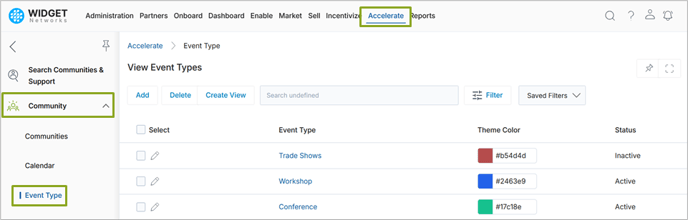
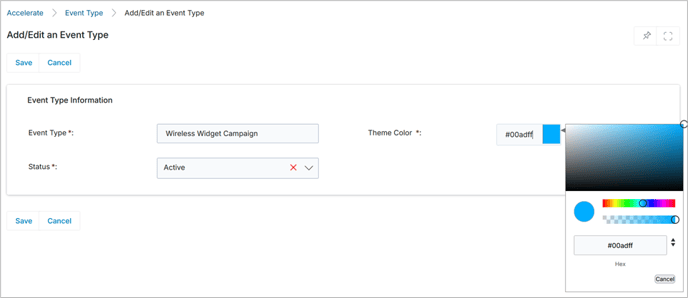
3. Add a new Event Type by providing a name, selecting a color, and marking it as Active and save the changes.
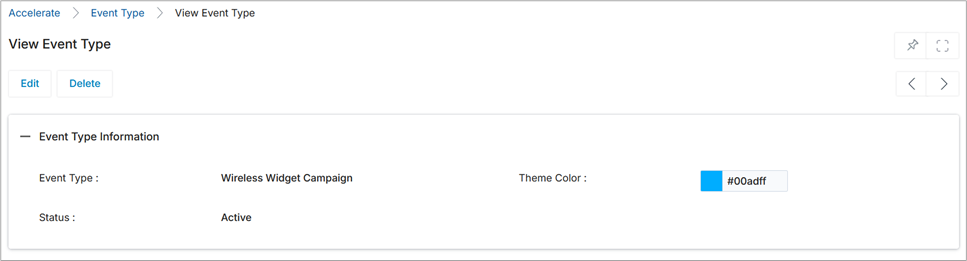
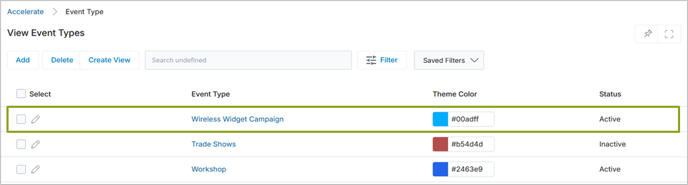
4. Verify that the event type appears in the View Event Types page.
- [Administration](https://adminhelp.zinfi.net/admin_help/administration?hsLang=en#main-content)
- [Workflow](https://adminhelp.zinfi.net/admin_help/administration?hsLang=en#workflow)
- [Accelerate](https://adminhelp.zinfi.net/admin_help/accelerate?hsLang=en#main-content)
- [Community](https://adminhelp.zinfi.net/admin_help/accelerate?hsLang=en#community)
- [UPM Supporting Documents](https://adminhelp.zinfi.net/admin_help/upm-supporting-documents?hsLang=en#main-content)
- [ZINFI UPM Release Notes](https://adminhelp.zinfi.net/admin_help/upm-supporting-documents?hsLang=en#zinfi-upm-release-notes)
- [Release Notes](https://adminhelp.zinfi.net/admin_help/release-notes?hsLang=en#main-content)
- [Release Notes 24.4](https://adminhelp.zinfi.net/admin_help/release-notes?hsLang=en#release-notes-24-4)
- [Release Notes 25.1](https://adminhelp.zinfi.net/admin_help/release-notes?hsLang=en#release-notes-25-1)
- [Release Notes 25.2](https://adminhelp.zinfi.net/admin_help/release-notes?hsLang=en#release-notes-25-2)
- [Release Notes 25.3](https://adminhelp.zinfi.net/admin_help/release-notes?hsLang=en#release-notes-25-3)
- [Release Notes 25.4](https://adminhelp.zinfi.net/admin_help/release-notes?hsLang=en#release-notes-25-4)
- [Document Library](https://adminhelp.zinfi.net/admin_help/document-library?hsLang=en#main-content)
- [02-00](https://adminhelp.zinfi.net/admin_help/document-library?hsLang=en#02-00)
[](http://www.zinfi.com)
[mailto:email@email.com](mailto:email@email.com)
Copyright © 2026, ZINFI Technologies, Inc.